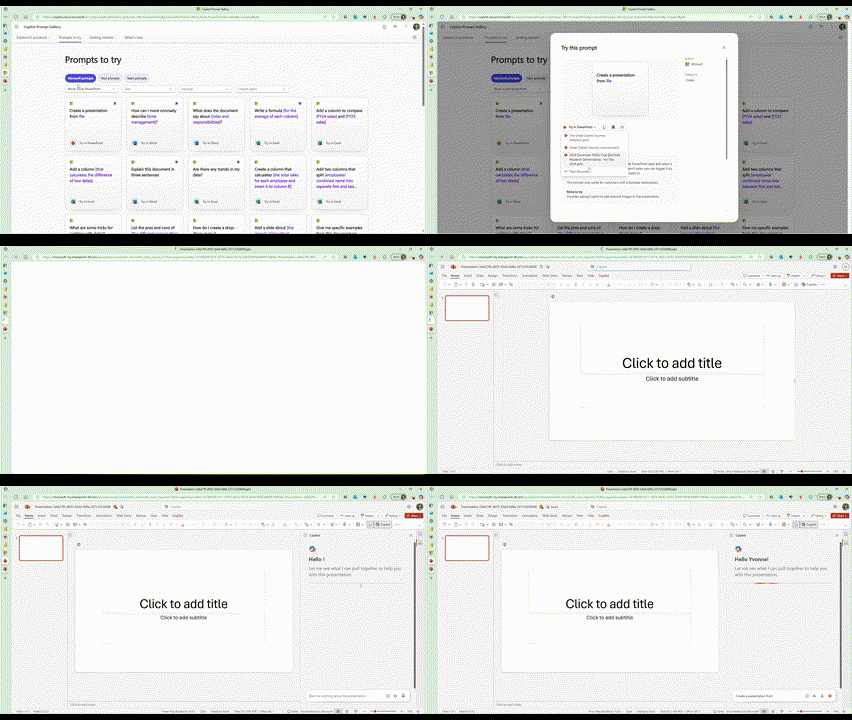
Try Prompts in X
Problem
500K users visited the Copilot Prompt Gallery website (see above) every month, but the traffic lead to a dead end.
Users had to manually copy prompts, navigate to the correct Microsoft 365 app, and paste before submitting, a 6-step workflow with significant drop-off at each stage.
Prompt usage was a leading indicator of Copilot retention: users who tried prompts were 70% more likely to return. That made the funnel drop-off a direct retention and growth problem.
Solution
I led a cross-product initiative to transform the Prompt Gallery website from a static content site into an interactive activation surface by introducing a one-click “Try in X” experience.
Each prompt got a "Try in X" button that opened the right app (Copilot Chat, Word, Excel, or PowerPoint) in a new tab with the prompt pre-populated — ready to add context and submit (see cover image above)
The solution reduced the user journey from 6 steps to 4:
This resulted in:
70% website → in-app activation rate of high intent users
99% reliability in landing users in-app
50% reduction in latency (time from click to seeing the prompt pasted)
Established a scalable foundation for future cross-surface experiences
My Role & Takeaways
Led a cross-functional initiative across 5 product and engineering teams to align on a shared goal of reducing cross-application friction (Cross-Functional Leadership, Product Ownership)
Influenced partner teams to prioritize latency and reliability as user-facing product metrics, not just engineering concerns (Stakeholder Management, Systems Thinking)
Diagnosed and resolved performance bottlenecks by instrumenting the handoff flow and parallelizing app initialization, reducing latency by 50% (Analytical Thinking, Technical Collaboration)
Advocated for user trust by prioritizing 99% reliability and addressing edge cases like read-only file failures (User-Centric Decision Making, Quality at Scale)
Navigated tradeoffs by prioritizing activation over feature expansion (e.g., no auto-submit, no desktop support) to maximize speed and impact (Product Judgment, Prioritization)
Long Term Impact: This work enabled embedded links to be used in marketing initiatives and blog posts that empowered customers to try custom prompts from anywhere.